
A standing meeting link can sit in a calendar, wiki, or old email long after the call that created it. If the same address keeps working, every copy remains useful. Months later, remembering who has it becomes harder than sharing it in the first place.
That does not mean a reusable link always grants immediate entry. A password, waiting room, or other check may stand behind it. But the link is still a lasting route back to the room, and someone still has to manage that access.
Why should a screen-sharing room remain reusable when the conversation is over?
A room can be a place or a one-time object
The standing-room model treats a room as a place: one address that people revisit. The one-time model treats it as an object created for one conversation and retired with that conversation.
Linkside uses the second model. You create a fresh room, send its link, share your screen, and end the session. That room is not a permanent meeting space or an entry in an account dashboard. There are no Linkside accounts and no recent-room history to maintain.
This choice does not make a live link harmless. Someone who receives it can still try to use it while the room is open. A shorter lifetime simply reduces how long the link remains useful and removes the job of remembering to revoke it later.
The cost of a room that stays available
A long-lived room link creates three practical problems:
- A longer access window. A copied link can remain useful until someone changes or disables it.
- Audience drift. Each forward or paste creates another copy, while the owner’s memory of who received it gets less reliable.
- Maintenance. Reusable rooms, access lists, and old links eventually need review.
Web-session security offers a useful comparison. OWASP’s session guidance calls expiration timeouts mandatory because they reduce the time in which a stolen session can be used. It also says session identifiers should be random and meaningless: the identifier itself should reveal nothing useful. NIST’s digital-identity guidance likewise sets inactivity limits for higher-assurance authenticated sessions.
Neither document is a rulebook for screen-sharing rooms. The transferable idea is narrower: access identifiers should reveal little, and useful lifetimes should have an end.
How a Linkside room ends
Linkside’s room lifecycle has five stages:
- Created. The signaling service generates a random 10-character room code from
crypto.randomUUID(). It does not encode a name, account, or conversation details. - Open while active. A room has a 15-minute inactivity deadline. Meaningful activity—including joins, signaling, polling, and keep-alives—moves that deadline forward. An abandoned room expires 15 minutes after its last interaction.
- Ended or expired. When the host leaves, the room ends for everyone immediately. If an open room instead reaches its inactivity deadline, it becomes expired. In either case, it can no longer be joined.
- Tombstone. The service keeps the terminal room record for five more minutes. This short window lets a late visitor see “This room has ended” or “This room link has expired” instead of an unhelpful generic error.
- Deleted. After the tombstone deadline, the next lifecycle check removes the room’s storage record. The participant list, per-participant secrets, event log, and any room password hash go with it; the room record is not archived.
In short: created → open → ended or expired → five-minute tombstone → deleted.
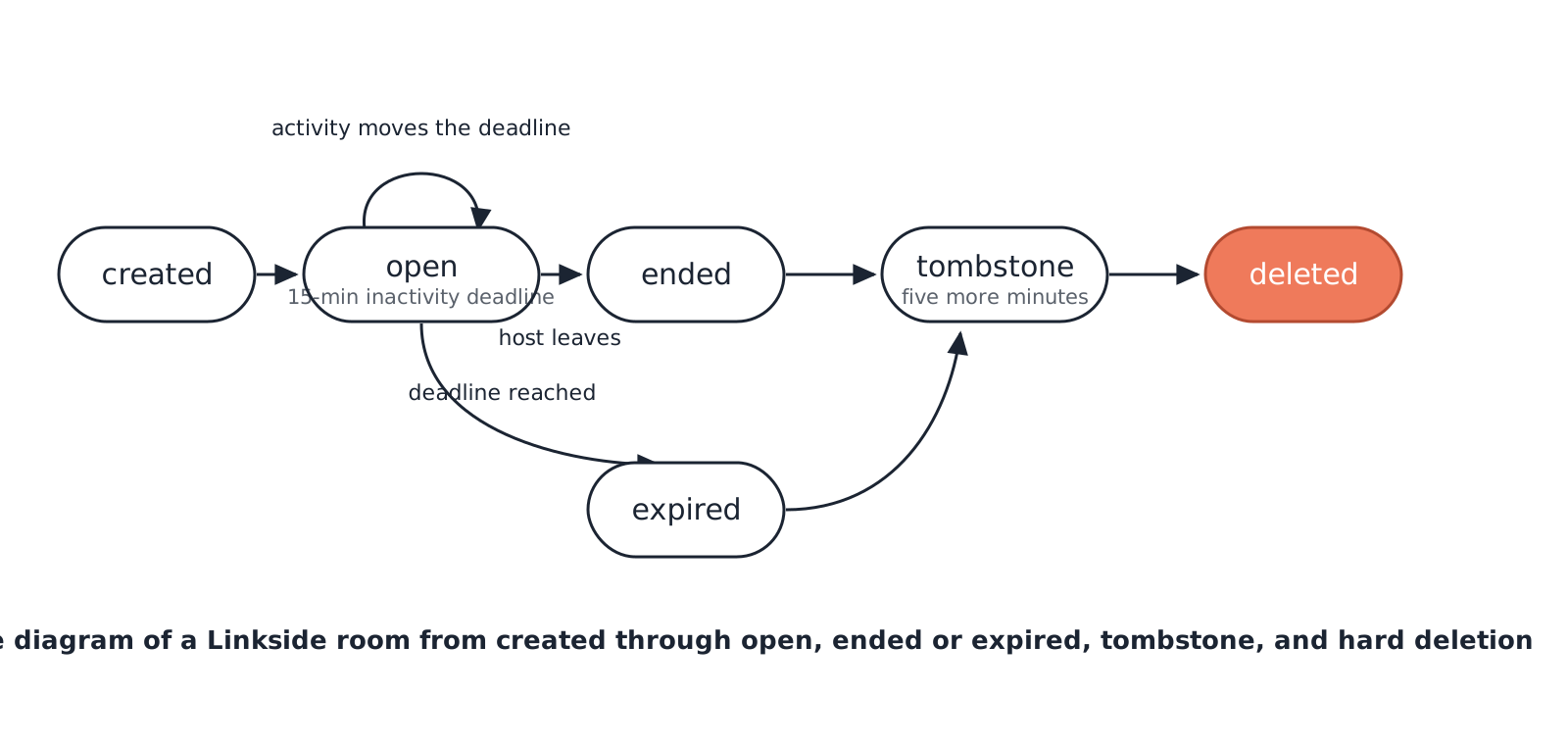
The tombstone matters because “gone” is not always the most useful immediate answer. For five minutes, the media session is over and nobody can join, but the service can still explain what happened. After that, the old code is treated as nonexistent.
Room identity does not become user identity
Each join creates a fresh participant ID and a fresh secret for that room. The browser stores the secret in tab-scoped sessionStorage, not as a lasting Linkside identity. When a participant leaves, their secret is removed from the room; when the room record is deleted, all remaining participant data is deleted with it.
There is no account connecting one room to the next, and the app has no room-history or recent-rooms screen. If you want the reasoning behind that choice, read why Linkside requires no account.
What deletion does—and does not—mean
Deleting a room record is not the same as claiming the service observes nothing. While a session is running, Linkside’s signaling worker necessarily sees that a room exists, roughly when guests join, and how long the session lasts. If a direct browser-to-browser connection cannot be established, an encrypted TURN relay routes the packets; the relay and its cloud edge can observe network traffic, but not the screen or audio content inside those encrypted packets.
Linkside does not record sessions, transcribe audio, analyse screen contents, or keep chat logs. The temporary operational observations are not paired with a Linkside user identity because there is no account to pair them with.
The honest tradeoff
There is no standing Linkside room to reuse. Every call begins with a new room and a new link. That is an extra step, even when the create-and-share flow is short. This 30-second room walkthrough shows what the step involves.
In return, rotation is built into the product. You do not need to remember to retire yesterday’s room or search an account dashboard for old links. A one-time room fits the job: show something to a few people you trust, then stop.
For the next conversation, create another object rather than reopening a permanent place. Create a room, share the link, and let that room end with the call.